A couple widget to keep your story in sight
Every time you unlock your phone: the number of days together, Mochi growing with your streak and, on iPhone, a button to send an “I love you” without even opening the app.
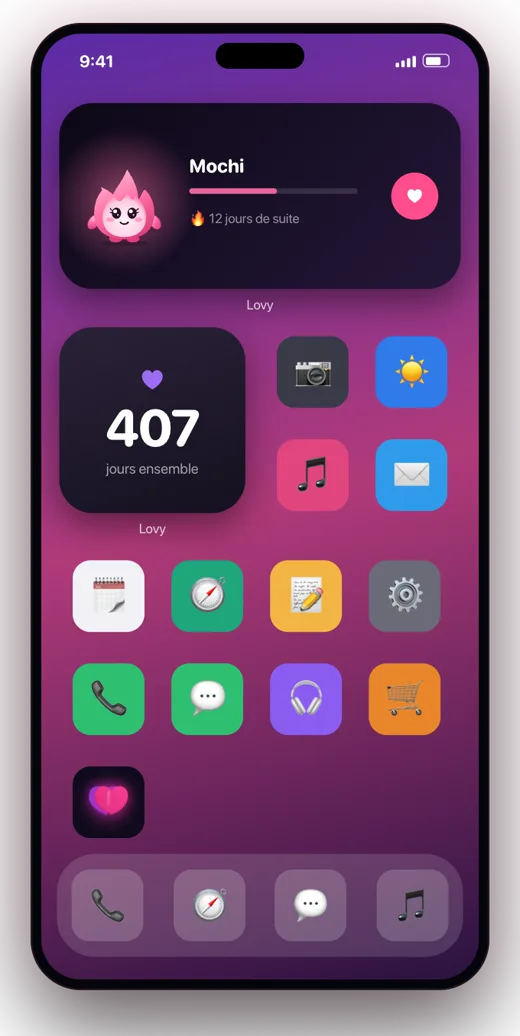

The Lovy widgets
Days together
Your relationship counter, which goes up by itself every day.
Mochi and your streak
Your flame, its age, your day streak and, on iPhone, a heart button to send an “I love you”.
Map of memories
Your pinned places and the latest memory added, at a glance.
Why a couple widget?
A widget is a small window of the app sitting on your home screen. For a couple, it's a quiet daily reminder: you see the number grow, you think of the other, you send a heart in a second. When you're apart, that little gesture often makes the day.
How to install it
It takes less than a minute: we've explained everything, step by step, in our couple widget tutorial for iPhone.
Download Lovy
Lovy is available on the App Store. Each of you installs it on your iPhone, you link your accounts with your couple code, and you're all set.
Free to download. Lovy Premium is optional.
Frequently asked questions
How do I add a couple widget to my home screen?
Press and hold on your home screen, add a widget and search for Lovy. We go through every step in our couple widget tutorial for iPhone.
Does the days-together counter update by itself?
Yes, it counts from the start date of your relationship, even if you don't open the app.